LearnSTL, STEP and CNC
STL vs STEP: which file to export for 3D printing, CNC, and editing later
STL is triangles, STEP is exact geometry. Modern slicers open both. Here is which one to export for the printer, the machine shop, and next year.
· 8 min read
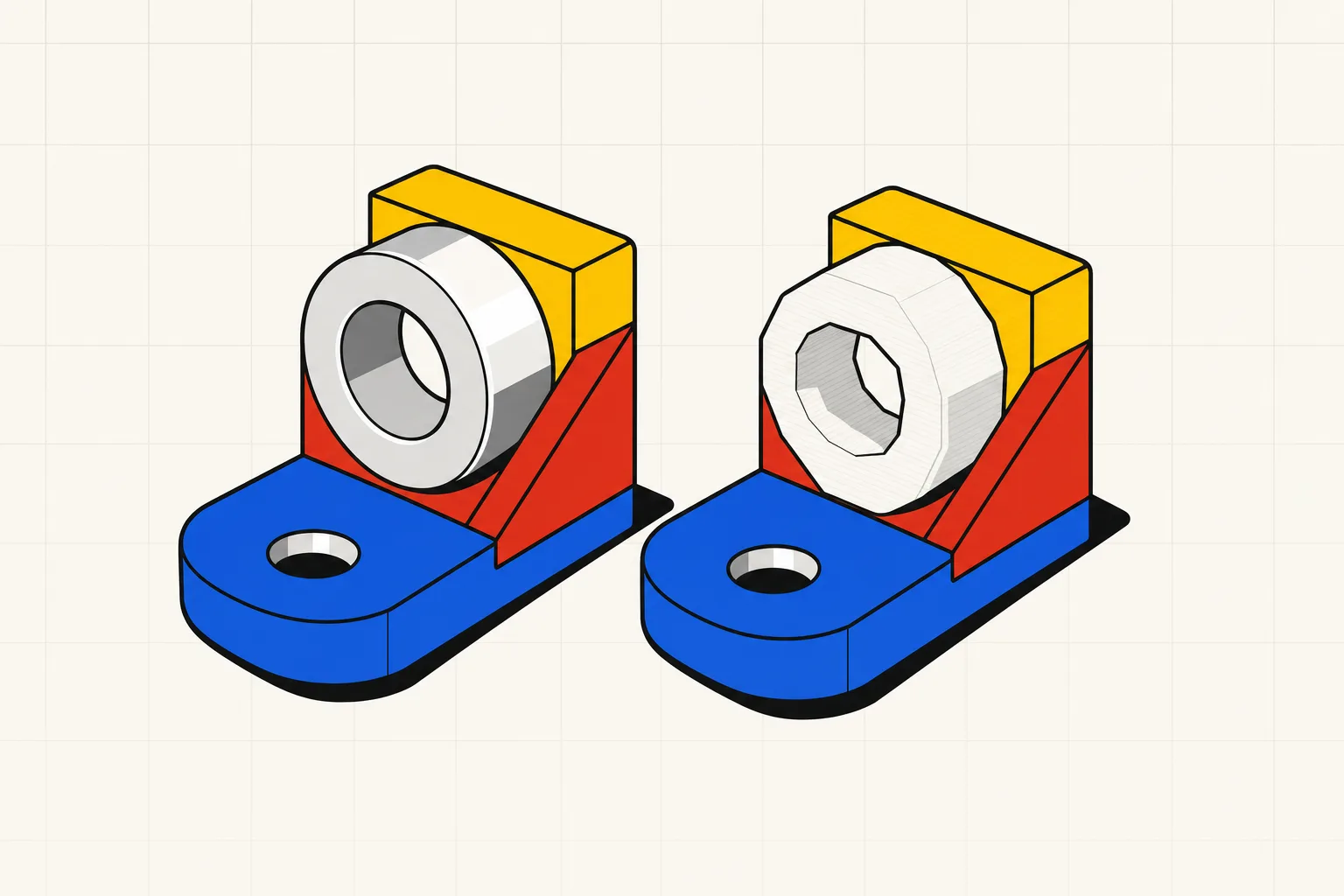
Export STEP whenever you can, and hand the slicer either one. Bambu Studio, OrcaSlicer and PrusaSlicer all mesh STEP on import, so the old rule that printers need STL no longer holds. STL still opens everywhere, including older slicers and every model-sharing site.
For 3D printing, either format works, and STEP is the better one to keep. An STL describes a part as a skin of flat triangles. A STEP file describes the same part as exact surfaces, so a hole is a true cylinder with a radius rather than a ring of facets. Bambu Studio, OrcaSlicer and PrusaSlicer all open STEP files directly and convert them to a mesh on import, so you can skip the STL export and let the slicer pick the triangle density. Use STL when the receiving software only reads meshes, or when you are uploading to a sharing site. Use STEP when the part might go to a CNC shop, when someone else needs to edit it, or when you want the file to still be useful in a year. If the part came from a mesh-only AI generator, there is no STEP to export.
How each format describes a part
An STL file stores nothing but triangles: three corner points each, plus a normal that says which side faces out. Curves do not exist. A cylinder becomes a ring of flat panels, and the only way to make it rounder is to add panels. There is no unit field: the coordinates are bare numbers, the slicer assumes millimetres, and a part drawn in inches arrives 25.4 times too small.
A STEP file stores boundary representation, or B-rep. It lists faces, and each face is a mathematical surface: a plane, a cylinder, a spline. A 10 mm hole is written as a cylinder with a 5 mm radius and an axis. Units are part of the file. So are separate bodies: an assembly of five parts stays five parts. The format is ISO 10303, which nearly every CAD package reads and writes. Its history and the AP203 versus AP214 flavours are in what a STEP file is.
The catch is that STEP carries geometry, not history. A forum user at Alibre put it bluntly: the format has no feature tree, so a STEP is a dumb solid. You can push and pull faces in CAD, but the sketch and the extrude that made them are gone. That is why a parametric text-to-CAD tool keeps the model on its side and treats STEP as an output.
3MF is a triangle mesh in a container. The 3MF core specification defines the file as a ZIP archive holding an XML model. That model has a unit attribute (millimetre by default), per-triangle material references, and metadata fields such as Title, Designer and LicenseTerms. A printable mesh must be manifold with outward-facing normals, which is why the consortium calls the format watertight by spec. Slicers use the same container for projects, and PrusaSlicer lists 3MF as "the preferred file format also used to save Project files."
The three formats side by side
| STL | STEP | 3MF | |
|---|---|---|---|
| Geometry | Triangle mesh | B-rep: exact faces and curves | Triangle mesh |
| Units | None, the slicer assumes mm | Stored in the file | Unit attribute, millimetre by default |
| Colour and metadata | None | Assembly structure, sometimes PMI | Materials, colours, designer and licence metadata, slicer settings |
| Editable in CAD | Only as a mesh | Yes, as solid bodies | Only as a mesh |
| Slicer support | Everything | Bambu Studio, OrcaSlicer, PrusaSlicer | Most modern slicers |
| Size | Often 2 to 10 times a STEP of the same part | Smallest for parts with round features | Mesh in a ZIP archive |
The size row comes from an Alibre forum user comparing their own parts: "the stls are at least 2x, but sometimes 10x the step file sizes. But there are cases where the stl is smaller." A widely shared r/3Dprinting post measured three parts and found the STEP between a fifth and a twentieth of the STL on disk. Choose on editability. Size is a rounding error next to that.
What changed for hobbyists
For most of the hobby's history slicers ate STL, so you exported STL. That ended when Bambu Studio, OrcaSlicer and PrusaSlicer learned to mesh STEP on import.
The Bambu Lab wiki states it directly: "Bambu Studio supports importing models and assembly from STEP files. And this is based on OpenCASCADE. So model designers don't need to export STL model files from CAD software, but can drag the STEP file into Bambu Studio directly to open it and slice." The same page explains what happens next: Bambu Studio "converts models into triangular mesh automatically" at a tolerance under half its arc-fitting tolerance, so "it is converted into a high-precision STL model in Bambu Studio." The fine mesh lets the slicer fit more G2 and G3 arc moves, which Bambu says reduces vibration in a fast print.
OrcaSlicer's wiki is just as plain. STL "is the basic file format used for the slicing process in OrcaSlicer. Any other supported file formats (e.g., STEP, 3MF, OBJ) are converted to STL during the import process." Opening a STEP brings up a dialog. Linear deflection "specifies the maximum distance allowed between the original surface and its polygonal approximation", and angular deflection caps the angle between them. Smaller values mean a finer mesh and a slower slice. A checkbox splits compounds into separate objects, so a multi-body STEP lands as separate parts.
PrusaSlicer's format list says it in seven words: "The STEP file is triangulated during import."
So here is the honest version of "STEP prints better". The printer never sees a STEP, only a mesh, made either by your CAD export or by the slicer's importer. Sovol concedes that a fine-tolerance STL "can produce an identical toolpath." The r/3Dprinting post found worse than parity: on a nozzle full of curves, the slicer's STEP conversion showed "large artifacts that do not exist in the STL version" exported from Fusion. What STEP buys you is meshing at the last moment, at a density you choose, from geometry nobody degraded on the way. That choice lives in the deflection dialog. A Bambu forum poster showed the other case on one Onshape part: after simplifying, the STL had 232 polygons and the STEP-derived mesh 816, and the STL's ridges showed in the print. With STEP, you make the triangle-count decision at import instead of export.
When to export which
Sending to your own slicer this week. Export STEP if the slicer is Bambu Studio, OrcaSlicer or PrusaSlicer. Drag it in, tighten the deflection if curves look faceted, print. If it is an older slicer or a print service that lists STL only, export STL from the same model with a tolerance fine enough for your smallest radius.
Sending to a machine shop. STEP, every time, with a PDF drawing for the tolerances. GaugeHow's file-type guide boils it down: "Send STEP if the shop must measure, simulate, or program toolpaths. Send STL if the slicer must build layers." Extreme Molding says the same from the moulding side: for CNC or injection moulding, "STP files are necessary." A mesh forces the shop to reverse-engineer the part before quoting it.
Editing next year. STEP, and keep the parametric source if you have one. A STEP opens in Fusion, FreeCAD or Onshape as a solid you can modify face by face. An STL opens as thousands of facets. Mesh-to-solid converters exist and mostly choke on real parts, the subject of how to edit an STL file. GaugeHow on converting STL back to STEP: "Not reliably. A mesh has triangles, not true faces. Converting back rebuilds geometry, so small radii and edges degrade first."
Sharing on Printables or MakerWorld. Upload the STL or 3MF the site expects, and attach the STEP for the remixers. It costs one extra export.
Multi-colour or a tuned print profile. 3MF, the only one of the three that carries filament assignments, painted supports and print settings in one file.
Why a text-to-CAD tool exports both
Most AI 3D model generators produce a mesh, because they generate surfaces the way image models generate pixels. That output has no faces and no units, so there is no STEP to export, which matters if you plan to machine the part or edit it later. We cover it in a separate guide on AI model generators for 3D printing.
Type Parts works the other way round. You describe the part in a sentence and get a build123d model on the OCCT kernel, the Open CASCADE engine that Bambu Studio's STEP importer is built on. The model is B-rep from the start, with sliders on the dimensions. STEP export writes that geometry out as it is. STL export tessellates it the moment you click download, so the mesh is never more than one step from the exact source. One part is free to try with no account, as a preview. STL export starts on the Hobby plan and STEP on Maker and above. The pricing page has the numbers.
STL goes to the slicer today. STEP goes to the machine shop, or into a folder for the day the bracket needs a fourth hole. And the sentence that made the part stays editable, which neither file can offer.